My Settings ⚙️
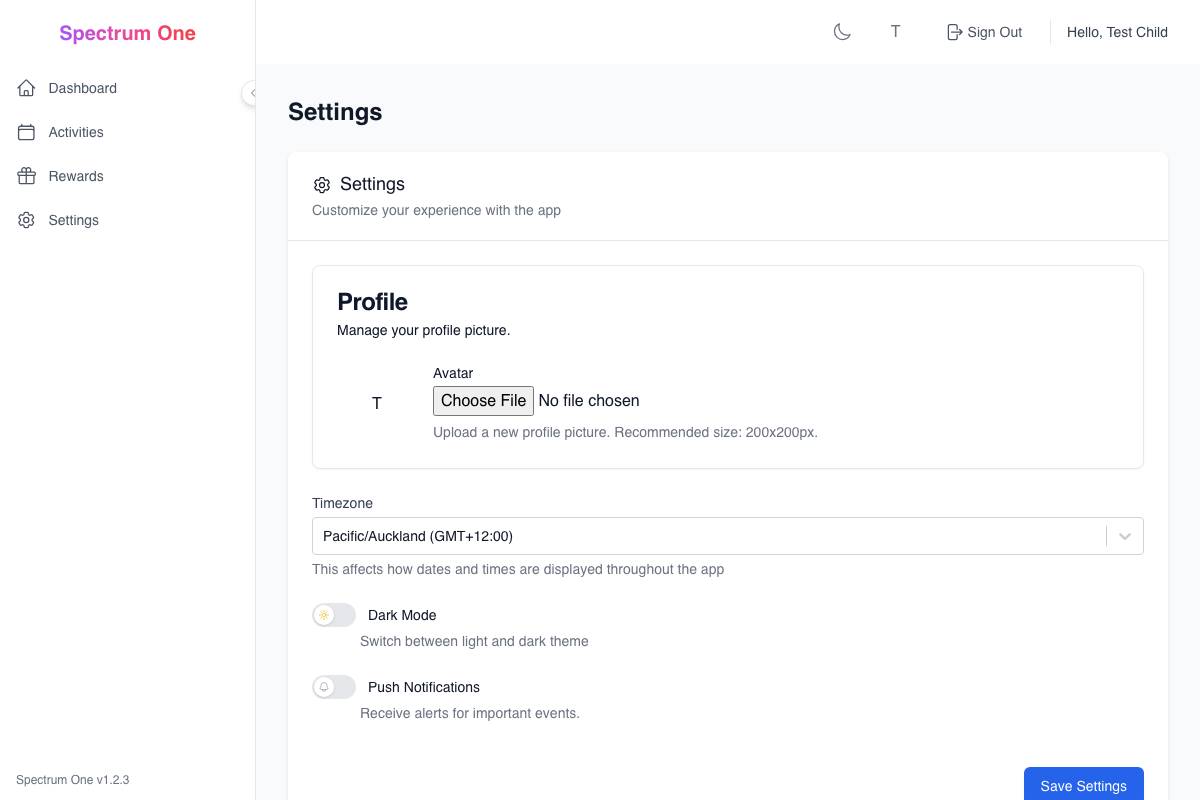
Welcome to your personal settings! This is where you can make Spectrum One work just right for you. Think of it like customizing your own special workspace - you can change colors, sounds, and how things work to make everything more comfortable and fun!
What Are Settings? 🤔
Settings are like the control panel for your Spectrum One experience. Just like you might adjust the volume on your tablet or change the brightness on a screen, these settings help make the app work better for YOU specifically.
You can change things like:
- 🎨 How everything looks (colors, sizes, themes)
- 🔔 When and how you get reminders
- 🎯 What kinds of activities you see
- 🏆 How you earn and spend points
- 🔒 Who can see your progress
Getting to Your Settings 🗺️
To find your settings:
- Look for the gear icon ⚙️ - Usually in the top corner or main menu
- Tap "My Settings" - This opens your personal control panel
- Explore the different sections - Each area controls different things
- Ask for help - Your parents can help you understand any setting
ADHD Tip: Don't worry about changing everything at once! Try one or two settings first, see how they feel, then adjust more later.
Making Things Look Good 🎨
Colors and Themes
Choose how your app looks:
Theme Options
- 🌞 Light Theme - Bright background, dark text (like reading a book)
- 🌙 Dark Theme - Dark background, light text (easier on eyes in dim rooms)
- 🌈 High Contrast - Extra bold colors that are easier to see
- 🎨 Custom Colors - Pick your favorite color combinations
Fun Customizations
- Choose your favorite background colors
- Pick fun accent colors for buttons and highlights
- Select emoji styles and sizes
- Customize your profile avatar and decorations
Text and Reading
Make text easier to read:
Text Size
- 📏 Small - Fits more on screen
- 📏 Medium - Standard size (good for most people)
- 📏 Large - Bigger and easier to read
- 📏 Extra Large - Very big for easier reading
Font Choices
- Standard fonts for regular reading
- Dyslexia-friendly fonts for easier letter recognition
- Fun fonts for special occasions
- Bold options for better visibility
Autism Support: If bright colors or busy patterns feel overwhelming, try the "Calm" theme with softer colors and simpler designs.
Sounds and Notifications 🔔
Sound Settings
Control what you hear:
Notification Sounds
- 🔊 Volume Level - How loud notifications are
- 🎵 Sound Choice - Pick from different notification sounds
- 🔇 Silent Mode - Turn off sounds completely
- ⏰ Quiet Hours - Times when sounds are automatically quiet
Activity Sounds
- Success sounds when you complete activities
- Point-earning "cha-ching" sounds
- Streak celebration sounds
- Gentle reminder chimes
Getting Reminders
Choose how you want to be reminded:
Reminder Types
- 📱 Pop-up Messages - Appear on your screen
- 📧 Gentle Notifications - Small notices that don't interrupt
- 🎵 Sound Alerts - Audio reminders
- 📳 Vibration - For devices that can vibrate
When to Get Reminders
- Right when activities become available
- 15 minutes before activities are due
- When you've earned enough points for a reward
- When you're close to achieving a streak
ADHD Tip: Try different reminder styles to see what helps you remember best. Some kids like sounds, others prefer visual reminders!
Activity Preferences 🎯
What Activities You See
Customize your activity experience:
Activity Categories Choose which types of activities you want to see more of:
- 🏠 Home Activities - Chores and helping around the house
- 📚 Learning Activities - Educational and skill-building tasks
- 🎨 Creative Activities - Art, music, and creative projects
- 🏃 Physical Activities - Movement and exercise
- 👥 Social Activities - Spending time with family and friends
Difficulty Levels Tell the app what feels right for you:
- 🟢 Easy - Simple tasks you can do quickly
- 🟡 Medium - Tasks that take some effort but aren't too hard
- 🟠 Challenging - Harder tasks that help you learn new things
- 🔴 Expert - Very difficult tasks for when you're ready for big challenges
Activity Scheduling
Control when activities appear:
Best Times for You
- 🌅 Morning Person - More activities in the morning
- 🌞 Afternoon Energy - Peak activities in the afternoon
- 🌙 Evening Activities - Tasks scheduled for evening time
- 🔄 Flexible - Activities spread throughout the day
Break Preferences
- How often you want break reminders
- How long your breaks should be
- What you like to do during breaks
- When you need transition warnings
Autism Support: Set up your schedule to match your natural energy patterns. If mornings are hard, schedule easier activities then and save challenging ones for your best times.
Rewards and Points 🏆
How You Like to Earn Points
Customize your reward experience:
Point Earning Style
- 🎯 Instant Gratification - Get points right away for everything
- 📈 Streak Focused - Earn more points for doing activities many days in a row
- 🎖️ Quality Bonus - Extra points for doing really good work
- 🎪 Surprise Rewards - Random bonus points to keep things exciting
Celebration Style Choose how you want to celebrate achievements:
- 🎉 Big Celebrations - Lots of confetti and fanfare
- 😊 Gentle Recognition - Quiet, simple acknowledgment
- 🏆 Badge Collection - Focus on earning achievement badges
- 📊 Progress Tracking - See your improvement over time
Reward Preferences
Tell the app what motivates you:
Types of Rewards You Like
- 🎮 Digital Rewards - Extra screen time, games, apps
- 🎨 Creative Rewards - Art supplies, craft time, creative projects
- 👥 Social Rewards - Time with friends, family activities
- 🍕 Experience Rewards - Special outings, treats, privileges
- 🧸 Physical Rewards - Toys, books, special items
Privacy and Safety 🔒
What Others Can See
Control your privacy:
Family Sharing
- What parents can see about your activities
- Whether siblings can see your progress
- What gets shared in family reports
- How much detail others can view
Achievement Sharing
- Whether your badges are visible to family
- If your streaks are celebrated publicly
- What goes in family newsletters
- How your progress appears in reports
ADHD Tip: It's okay to want some privacy! Talk with your parents about what feels comfortable to share and what you'd like to keep private.
Accessibility Features ♿
Making Things Easier to Use
Special features to help you succeed:
Visual Helpers
- 🔍 Zoom Features - Make everything bigger when needed
- 👁️ Focus Modes - Highlight important information
- 🎯 Simplified Views - Remove distracting elements
- 🌈 Color Coding - Use colors to organize information
Attention and Focus Support
- 🎯 Distraction Reduction - Hide unnecessary elements
- ⏰ Time Awareness - Visual timers and progress indicators
- 🔔 Gentle Reminders - Soft prompts to stay on task
- 🧘 Break Suggestions - Automatic rest period recommendations
Communication Support
Help with understanding and expressing:
Language Options
- 📖 Simple Language - Easier words and shorter sentences
- 🖼️ Visual Instructions - Pictures and diagrams with text
- 🎭 Social Stories - Narrative explanations of activities
- 🗣️ Audio Instructions - Spoken directions and explanations
Autism Support: Don't be afraid to use accessibility features! They're designed to help you be successful and comfortable. Everyone learns and works differently.
Getting Help with Settings 🆘
When You Need Assistance
It's totally normal to need help with settings:
Who Can Help
- 👨👩👧👦 Parents or Guardians - They can help you understand options
- 👥 Siblings - Older siblings might know how to change things
- 👩🏫 Teachers - If you use this at school, teachers can help
- 💬 Support Team - The Spectrum One team can answer questions
What to Ask For Help With
- Understanding what a setting does
- Figuring out which option is best for you
- Fixing something that isn't working right
- Learning about new features
- Changing something back if you don't like it
Trying New Settings
Experimenting is part of learning:
Safe to Try
- Most settings can be changed back easily
- You won't break anything by experimenting
- Your parents can help reset things if needed
- The app will remember what worked before
How to Experiment
- Pick one setting - Don't change everything at once
- Try it for a few days - Give it a real chance
- Notice how it feels - Does it help or make things harder?
- Ask others - What do your parents or siblings think?
- Adjust or change back - Keep what works, change what doesn't
Remember: It's All About You! 💖
The most important thing about settings is that they should make YOUR experience better. Don't worry about what settings other people use - focus on what makes you feel comfortable, successful, and happy.
Key Things to Remember
- 🎯 There's no "wrong" way - Use whatever settings help you
- 🔄 You can always change - Nothing is permanent
- 🤝 Ask for help - Parents and support team are there for you
- 🌟 You're the expert - You know what feels right for you
- 🎉 Have fun - Settings should make things more enjoyable!
Next Steps 🚀
Ready to customize your Spectrum One experience?
- Start with one area - Maybe try changing your theme colors first
- Ask for help - Get a parent to sit with you while you explore
- Take your time - Don't rush to change everything at once
- Notice what helps - Pay attention to what makes things easier or more fun
- Share your discoveries - Tell your family what works well for you!
Remember: These are YOUR settings for YOUR experience. Make them work for you! 🌟
Need help with settings? Ask your parents, or they can check out:
- Parent Settings Guide - Detailed information for parents
- Getting Help - When you need assistance
- Activity Guide - Learn about customizing activities