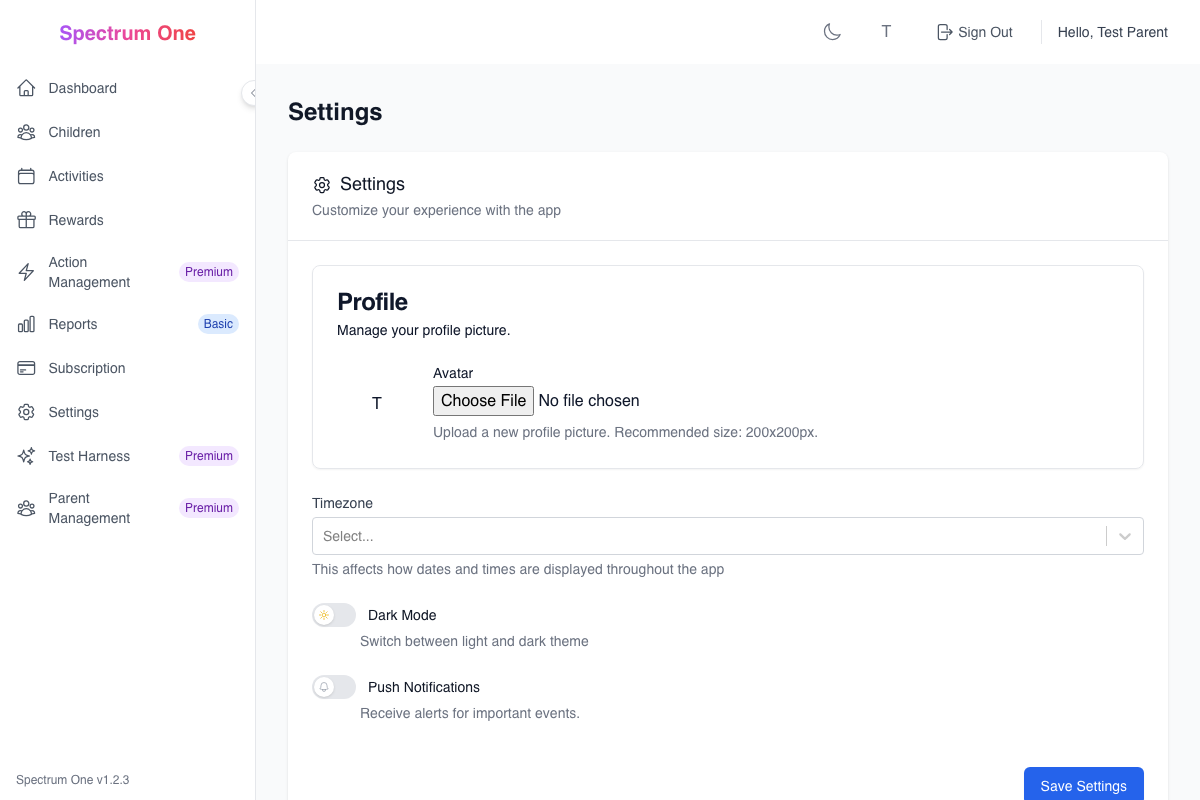
Settings
The Settings area provides comprehensive control over your family's Spectrum One experience. From here, you can customize accessibility features, manage account security, configure notifications, and adjust system preferences to best support your child's unique needs.
Overview
The Settings dashboard is organized into key areas:
Account Management - Profile, billing, and subscription settings
Child Profiles - Individual settings and accessibility preferences for each child
System Preferences - App behavior, notifications, and interface customization
Privacy & Security - Data protection, sharing controls, and safety settings
Account Management
Profile Information
Manage your parent account details:
Basic Information
- Full name and display name
- Email address (login credential)
- Profile photo
- Timezone and location
- Preferred language
Contact Preferences
- Communication preferences
- Newsletter subscriptions
- Product update notifications
- Emergency contact information
Account Security
- Password management
- Two-factor authentication Premium
- Login history and active sessions
- Security question setup
ADHD Tip: Set up email notifications for important events like activity completions or streak achievements to help you stay engaged with your child's progress.
Subscription Management
Control your Spectrum One subscription:
Current Plan
- Active subscription tier
- Billing cycle and next payment
- Feature usage summary
- Upgrade/downgrade options
Billing Information
- Payment methods on file
- Billing history and invoices
- Tax information
- Automatic renewal settings
Plan Changes
- Upgrade to higher tiers
- Downgrade options and timing
- Pause subscription Premium
- Cancellation process
Family Management Basic+
Coordinate with other caregivers:
Co-Parent Access
- Invite other parents or guardians
- Set permission levels
- Manage active collaborators
- Remove access when needed
Permission Levels
- Full Access - Complete control over all settings
- Activity Manager - Can create and modify activities
- View Only - Can see progress but not make changes
- Child Specific - Access limited to certain children
Collaboration Settings
- Notification preferences for shared activities
- Conflict resolution for simultaneous edits
- Activity assignment delegation
- Progress sharing protocols
Child Profile Settings
Individual Child Configuration
Customize settings for each child:
Basic Profile
- Child's name and nickname
- Date of birth and age
- Profile photo and avatar
- Preferred pronouns
- Emergency contact information
Accessibility Preferences
- Visual accommodations
- Interaction style preferences
- Communication needs
- Sensory considerations
- Attention support features
Learning Profile
- Developmental stage indicators
- Learning style preferences
- Interest categories
- Skill level assessments
- Goal-setting preferences
Autism Support: Take time to carefully configure each child's sensory and communication preferences. These settings significantly impact their comfort and success with the application.
ADHD-Specific Settings
Tailored support for ADHD characteristics:
Attention Management
- Optimal focus time periods
- Break frequency preferences
- Distraction management level
- Hyperfocus monitoring settings
- Transition warning timing
Motivation Systems
- Immediate vs. delayed reward preferences
- Point earning frequency
- Achievement celebration style
- Streak flexibility settings
- Gamification level
Time Management
- Activity duration preferences
- Reminder timing and frequency
- Schedule flexibility options
- Time estimation support
- Deadline management approach
Autism-Specific Settings
Customized support for autistic children:
Sensory Accommodations
- Visual contrast and brightness
- Sound and vibration preferences
- Animation and movement settings
- Color scheme customization
- Interface simplification options
Communication Support
- Language complexity level
- Visual instruction preferences
- Social story integration
- Alternative communication methods
- Processing time accommodations
Routine and Structure
- Predictability preferences
- Change notification requirements
- Routine flexibility settings
- Transition preparation time
- Schedule consistency needs
Behavioral Support
- Self-regulation tools
- Emotional check-in frequency
- Stress indicator monitoring
- Coping strategy reminders
- Sensory break scheduling
System Preferences
Interface Customization
Personalize the app experience:
Visual Settings
- Theme selection (light, dark, high contrast)
- Font size and style options
- Color scheme preferences
- Icon style and size
- Layout density options
Navigation Preferences
- Menu organization
- Quick access shortcuts
- Breadcrumb visibility
- Search functionality
- Keyboard navigation support
Dashboard Configuration
- Widget selection and arrangement
- Information density
- Update frequency
- Default views and filters
- Quick action buttons
ADHD Tip: Customize the dashboard to show the most important information first. Reduce visual clutter by hiding less critical widgets and information.
Notification Management
Control how and when you receive updates:
Activity Notifications
- Completion alerts
- Overdue activity warnings
- Evidence submission notifications
- Streak milestone celebrations
- Goal achievement announcements
System Notifications
- App updates and new features
- Maintenance and downtime alerts
- Security and privacy updates
- Billing and subscription changes
- Community and support messages
Delivery Methods
- In-app notifications
- Email notifications
- Push notifications (mobile)
- SMS alerts Basic+
- Calendar integration
Timing Controls
- Quiet hours settings
- Weekend notification preferences
- Holiday and vacation modes
- Time zone considerations
- Frequency limitations
Data and Privacy Settings
Manage your family's data:
Data Collection
- Analytics and usage tracking
- Performance monitoring
- Error reporting
- Feature usage statistics
- Personalization data
Data Sharing
- Anonymous usage statistics
- Research participation
- Community features
- Third-party integrations
- Professional sharing controls
Data Export and Backup
- Automatic backup settings
- Manual export options
- Data retention periods
- Account deletion procedures
- Legacy planning options
Privacy and Security
Child Safety Settings
Protect your children online:
Account Security
- Child login requirements
- Password policies
- Session timeout settings
- Device restrictions
- Location-based access
Content Filtering
- Age-appropriate content
- Activity type restrictions
- Communication limitations
- External link policies
- Media upload guidelines
Monitoring and Supervision
- Activity monitoring level
- Evidence review requirements
- Communication oversight
- Progress sharing controls
- Alert thresholds
Autism Support: Consider your child's need for privacy and independence when setting monitoring levels. Balance safety with respect for their growing autonomy.
Data Protection
Ensure family information security:
Encryption Settings
- Data encryption at rest
- Transmission security
- Backup encryption
- Device-level protection
- Cloud storage security
Access Controls
- Multi-factor authentication
- Device authorization
- IP address restrictions Premium
- Session management
- Audit logging
Compliance and Legal
- COPPA compliance settings
- FERPA educational records
- HIPAA healthcare privacy
- GDPR data rights
- State privacy regulations
Sharing and Permissions
Control who can access your data:
Professional Sharing Basic+
- Teacher access levels
- Therapist data sharing
- Healthcare provider reports
- Educational institution integration
- Legal guardian coordination
Family Sharing
- Extended family access
- Babysitter permissions
- Grandparent involvement
- Sibling interaction settings
- Household coordination
External Integrations
- Calendar synchronization
- Educational platform connections
- Healthcare system integration
- Community platform sharing
- Research participation
Advanced Settings Premium
AI and Automation
Configure intelligent features:
AI Recommendations
- Activity suggestion algorithms
- Difficulty adjustment automation
- Schedule optimization
- Reward recommendation engine
- Goal-setting assistance
Predictive Analytics
- Behavior pattern recognition
- Performance prediction
- Intervention timing
- Risk assessment
- Opportunity identification
Automation Rules
- Conditional activity creation
- Automatic reward distribution
- Smart notification timing
- Dynamic difficulty adjustment
- Personalized content delivery
Integration Management
Connect with external services:
Educational Platforms
- Learning management systems
- Grade book integration
- Assignment synchronization
- Progress reporting
- Communication channels
Healthcare Systems
- Electronic health records
- Therapy session coordination
- Medication tracking
- Appointment scheduling
- Provider communication
Smart Home Integration
- Device automation
- Environmental controls
- Routine synchronization
- Voice assistant integration
- IoT device coordination
Mobile and Device Settings
Multi-Device Synchronization
Manage access across devices:
Device Management
- Registered devices list
- Synchronization settings
- Offline capabilities
- Device-specific preferences
- Remote access controls
Mobile App Settings
- Push notification preferences
- Battery optimization
- Data usage controls
- Offline mode configuration
- Background sync settings
Cross-Platform Features
- Account synchronization
- Preference sharing
- Progress continuity
- Multi-device activities
- Family coordination
Troubleshooting Settings
Common Configuration Issues
Notification Problems
- Check notification permissions
- Verify email settings
- Review quiet hours configuration
- Test delivery methods
- Update contact information
Synchronization Issues
- Verify internet connection
- Check device time settings
- Review synchronization preferences
- Clear cache and refresh
- Contact support for assistance
Access and Permission Problems
- Verify account credentials
- Check subscription status
- Review family member permissions
- Update security settings
- Reset authentication if needed
Settings Backup and Restore
Protect your configuration:
Backup Options
- Automatic settings backup
- Manual configuration export
- Cloud storage integration
- Local backup files
- Version history tracking
Restore Procedures
- Settings restoration process
- Selective preference recovery
- Default configuration reset
- Migration between accounts
- Emergency access procedures
Best Practices
Initial Setup Recommendations
- Start with child profiles - Configure accessibility settings first
- Set appropriate notifications - Balance information with overwhelm
- Configure privacy settings - Establish appropriate sharing levels
- Test with children - Ensure settings work for actual users
- Document preferences - Keep notes on what works best
Ongoing Maintenance
- Regular reviews - Monthly settings check and adjustment
- Child input - Ask children about their preferences
- Performance monitoring - Watch for settings that help or hinder
- Security updates - Keep authentication and privacy current
- Backup verification - Ensure settings are properly backed up
Family Coordination
- Shared understanding - Ensure all caregivers understand settings
- Consistent application - Use similar settings across devices
- Communication protocols - Establish how to discuss changes
- Change management - Plan how to implement setting updates
- Conflict resolution - Have procedures for disagreements
ADHD Tip: Don't try to configure everything at once. Start with the most important settings and gradually refine others as you learn what works best for your family.
Integration with Other Features
Activity System Connection
Settings directly impact:
- Activity difficulty and pacing
- Evidence requirements and formats
- Scheduling and reminder timing
- Reward earning and distribution
- Progress tracking and reporting
Analytics and Reporting
Configuration affects:
- Data collection and analysis
- Report generation and sharing
- Privacy and access controls
- Professional integration
- Performance monitoring
Reward System Integration
Settings influence:
- Point earning rates and bonuses
- Reward availability and timing
- Achievement recognition
- Motivation strategies
- Family coordination